Website: https://dungeondraft.net
Best For: Dungeon masters, virtual tabletop (VTT) users, and fantasy cartographers
Introduction
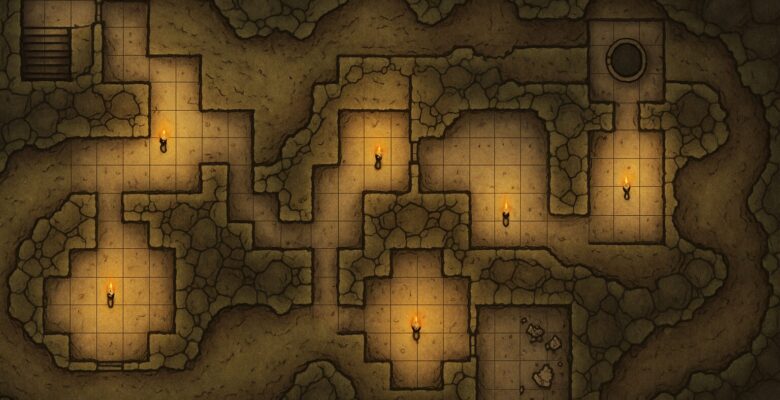
For game masters running tactical encounters or dungeon crawls, few assets are as important as a clear, engaging battlemap. Dungeondraft, developed by Megasploot (the creator of Wonderdraft), aims to fill that need with a fast, focused tool specifically designed for top-down fantasy map creation.
Unlike graphic design software or overly complex level editors, Dungeondraft strikes a perfect balance between usability and depth. It lets you create professional-looking dungeons, towns, and wilderness battle maps without a steep learning curve or time-intensive asset management.
Whether you’re prepping a session for a home campaign or designing modular content for publishing, Dungeondraft makes the process intuitive, customizable, and visually impressive.
User Interface & Workflow
Dungeondraft runs as a standalone desktop app for Windows, macOS, and Linux, with performance optimized for most modern PCs. Upon launching the app, you’re met with a clean, purpose-built interface:
- Toolbars on the left and top offer brushes, terrain, objects, and lighting tools.
- Layer controls and object details are tucked neatly on the right.
- A central canvas gives ample space for creativity.
The workflow is tile-free and drag-and-drop focused, with users painting terrain, drawing walls and paths, and placing objects on the fly. It avoids the clunky modular feel of grid-based tools, offering organic control over every detail while still exporting to grid-friendly formats for VTTs.
Key Features
🧱 Walls, Floors, and Rooms
Dungeondraft’s primary strength lies in quick dungeon construction. Using a brush-based system, you can:
- Draw modular rooms and hallways
- Customize wall types, floor materials, and door styles
- Add curvature, elevation, and thickness
With intuitive snapping and undo functionality, even first-time users can draft complex interiors in minutes.
🌿 Terrain and Environmental Tools
Unlike traditional dungeon-focused tools, Dungeondraft excels at outdoor and hybrid maps too. The terrain brushes allow you to:
- Paint grasslands, desert, snow, stone, and water
- Blend textures for realistic transitions
- Add cliffs, elevation drops, and water effects
The software supports multi-layer terrain, so you can create maps that transition from a cavern into a forest, or from a castle into a battlefield.
🧰 Objects and Props
Dungeondraft includes a massive collection of pre-installed objects, including:
- Tables, chairs, beds, barrels
- Statues, altars, doors, stairs
- Trapdoors, torches, wall decorations
- Wilderness elements like trees, rocks, and bushes
Each object can be resized, recolored, rotated, or layered, with shadow settings for added realism. The drag-and-drop system is fast and efficient, with filtering and search functionality to speed up workflow.
For GMs who need specific aesthetics, Dungeondraft supports custom asset packs in .dungeondraft_pack format. These are widely available from creators on sites like CartographyAssets.com, allowing nearly limitless expansion.
🔦 Lighting and Shadows
One of Dungeondraft’s standout features is its dynamic lighting engine. You can:
- Add point lights (e.g., torches, glowing crystals)
- Apply direction-based lighting
- Generate real-time shadows from walls and objects
- Set ambiance lighting or daylight filters
This makes maps far more immersive and atmospheric, particularly useful when exporting for VTT platforms like Foundry VTT or Fantasy Grounds that support fog-of-war or line-of-sight.
🧭 Grids, Labels, and Export
Dungeondraft is built with VTT compatibility in mind. It allows you to:
- Toggle square, hex, or gridless modes
- Define grid size and scaling
- Add notes or labels in custom fonts
- Export maps as PNG (with or without grid), or as UVTT files for instant Foundry use
The export resolution is high, so maps can be used digitally or printed for in-person play. You can even split large maps into tiles, which is perfect for modular printing or VTT upload limits.
Performance and Stability
Dungeondraft is remarkably fast and stable, even with high-resolution maps and dozens of objects. The real-time rendering engine ensures little to no lag during edits. Auto-saving and undo history reduce the risk of lost work, and project files remain relatively small and efficient.
While complex maps with many lighting and shadow layers may tax older systems, most users will find performance more than sufficient.
Community and Custom Assets
The Dungeondraft community is vibrant and generous, with a thriving ecosystem of:
- Free and paid asset packs
- Custom brushes, lighting presets, and style themes
- YouTube tutorials and Discord support
Creators frequently release themed sets—e.g., sci-fi interiors, pirate coves, Victorian cities—allowing you to push beyond traditional fantasy dungeons.
Asset installation is easy: simply drop the .pack files into the assets folder and activate them in settings.
Pricing and Licensing
Dungeondraft is available for a one-time purchase of approximately $19.99–$24.99 USD, depending on sales or bundles. There are no subscriptions, and your license covers future updates and asset support.
For creators or publishers, Dungeondraft allows limited commercial usage of maps created using the default and royalty-free assets—though it’s important to read the licensing terms for third-party asset packs.
Pros
✅ Lightning-fast dungeon and battlemap creation
✅ Dynamic lighting and shadows
✅ Highly customizable with asset packs
✅ Great value, one-time purchase
✅ Optimized for VTT platforms like Foundry
Cons
⚠️ No built-in layering effects like fog-of-war or tokens
⚠️ Only exports static maps (not interactive VTT maps)
⚠️ No native Macros or scripting tools
⚠️ Focused more on tactical maps than regional/world cartography
Final Verdict
Dungeondraft is arguably the best battlemap-making tool on the market for fantasy GMs and publishers. It’s lightning fast, powerful, and thoughtfully designed to match the real-world needs of tabletop gameplay. While it doesn’t handle everything—such as token placement or animated elements—it pairs beautifully with virtual tabletops and offers a deep, rewarding experience with minimal friction.
For GMs looking to make beautiful, game-ready maps in hours instead of days, Dungeondraft is a near-essential addition to their toolkit.