Website: https://www.wonderdraft.net
Best For: Fantasy mapmakers, game masters (GMs), authors, and worldbuilders
Introduction
Fantasy maps are a cornerstone of immersive storytelling in tabletop roleplaying games, novels, and video games. A compelling map doesn’t just show where things are—it invites exploration, sparks imagination, and shapes how stories unfold. Wonderdraft, a standalone mapping tool by Megasploot, has gained a reputation for offering professional-grade features in an accessible, affordable package.
Whether you’re a dungeon master crafting a homebrew world or a fantasy novelist needing a continent for your epic saga, Wonderdraft provides the tools to bring your setting to life. With a one-time payment and a wide user community, it’s become a go-to choice for creators seeking high-quality results without recurring subscription fees.
Interface & User Experience
Wonderdraft boasts a clean and intuitive interface. Upon launching the software, users are greeted with a straightforward workspace:
- A central canvas
- Tool panels on the left and top
- Layer and object settings on the right
Navigation is smooth, with zooming, panning, and layer control that feels natural. While it has a learning curve—especially for beginners—it’s far less daunting than complex graphics programs like Photoshop or GIMP. The interface design emphasizes usability, letting you stay focused on creativity rather than software mechanics.
Wonderdraft runs locally on Windows, Mac, and Linux, which means no internet connection is required after installation—a key benefit for those running offline or on limited-bandwidth devices.
Core Features
🗺️ Map Design & Generation
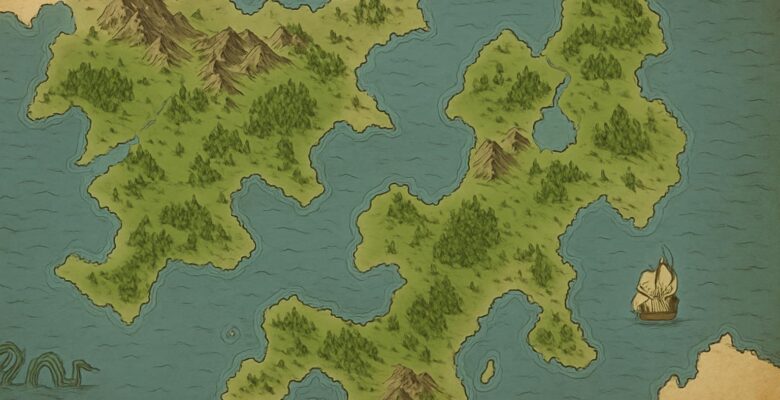
Wonderdraft allows you to start with a blank canvas or generate random landmasses, which you can then tweak manually using landform tools. You can:
- Draw coastlines and islands
- Elevate terrain with height maps
- Use brushes for eroding, smoothing, or shaping
- Add water bodies like rivers and lakes with flow-aware tools
These features combine naturalistic geography with creative control, offering the ability to craft believable, story-rich environments.
🌍 Customizable Landmasses & Biomes
Wonderdraft supports biome theming, allowing you to add desert, tundra, grasslands, and forest regions with appropriate textures and coloring. These are fully adjustable through color gradients, making it easy to differentiate continents or represent seasons.
Additionally, terrain types and regional styles can be layered, shaded, and blended for a painted, professional look. This elevates Wonderdraft above simpler tools that rely only on stamps or grids.
🏰 Assets & Symbols
A major strength of Wonderdraft is its object and symbol system. It includes a robust set of default icons—cities, towns, castles, mountains, trees, ruins, and more. These can be resized, rotated, and recolored dynamically. You can:
- Organize cities by region or culture
- Customize settlements and borders
- Drop in dungeons, landmarks, or fortresses
- Create labeled regions, nations, or danger zones
Better yet, Wonderdraft supports custom assets via the community or marketplaces like CartographyAssets.com. Thousands of free and paid symbol packs are available, letting you tailor your map to any aesthetic—gritty, whimsical, dark, high-fantasy, or minimalist.
🧭 Labels, Fonts, and Paths
Wonderdraft’s labeling system is one of the best in the business. You can:
- Auto-fit text along coastlines or roads
- Choose from fantasy fonts (or import your own)
- Add curved, angled, or shadowed labels
- Group and layer labels by hierarchy (e.g., nations, cities, landmarks)
Path tools allow you to draw roads, trade routes, borders, and coastlines with customizable styles and stroke types.
This level of detail is particularly helpful for worldbuilders aiming for both beauty and legibility. Maps made in Wonderdraft look like they could be printed in a published fantasy novel or campaign setting.
Export & Integration
Wonderdraft allows maps to be exported in high-resolution PNG formats, supporting transparency, layers, and grid overlays. Maps can be sized for print, PDF publication, or VTT platforms like Foundry, Roll20, and Fantasy Grounds.
You can export full maps or just region segments—ideal for zoomed-in tactical maps or world-level overviews.
For creators using external tools, Wonderdraft’s layered exports are compatible with graphic design software like Affinity Photo or Photoshop for additional post-processing.
Customization & Community Support
One of Wonderdraft’s greatest assets is its moddable architecture. Users can:
- Install custom themes (e.g., parchment, dark mode, watercolor)
- Add new brushes, fonts, and icons
- Use alternative biomes or map styles
The community at CartographyAssets.com provides free downloads, tutorials, and inspiration. There’s also a strong Discord presence and YouTube tutorials to help new users learn techniques or troubleshoot issues.
Pricing
Wonderdraft is sold via a one-time payment model—usually around $29.99 USD—with no subscriptions or microtransactions. Given the quality and flexibility of the tool, this is considered a tremendous value in the tabletop or publishing space.
There’s also frequent bundling with sibling software like Dungeondraft (for battlemaps), making it an appealing buy for full-spectrum mapmakers.
Pros
✅ Stunning visual output with minimal effort
✅ One-time purchase, no subscriptions
✅ Powerful coastline, terrain, and label tools
✅ Rich symbol library with third-party support
✅ Ideal for novels, campaigns, or worldbuilding
Cons
⚠️ Lacks dynamic layering or 3D terrain modeling
⚠️ Some features require a learning curve
⚠️ No built-in multiplayer or cloud saving
⚠️ Not suitable for real-time VTT map creation (use Dungeondraft instead)
Final Verdict
Wonderdraft is a powerhouse for fantasy worldbuilders and cartographers. It combines rich features with ease of use, enabling creators to design visually arresting maps without professional design skills. While it won’t replace tools for battlemaps or procedural 3D modeling, it excels at what it sets out to do: make gorgeous, fantasy-themed maps quickly and efficiently.
If you’re a GM building your own setting, an author mapping your fantasy world, or an indie publisher in need of print-quality maps, Wonderdraft offers unmatched value and creative freedom.